
Accounting Software for Philippine Businesses
Run your business. We'll handle the accounting behind it.
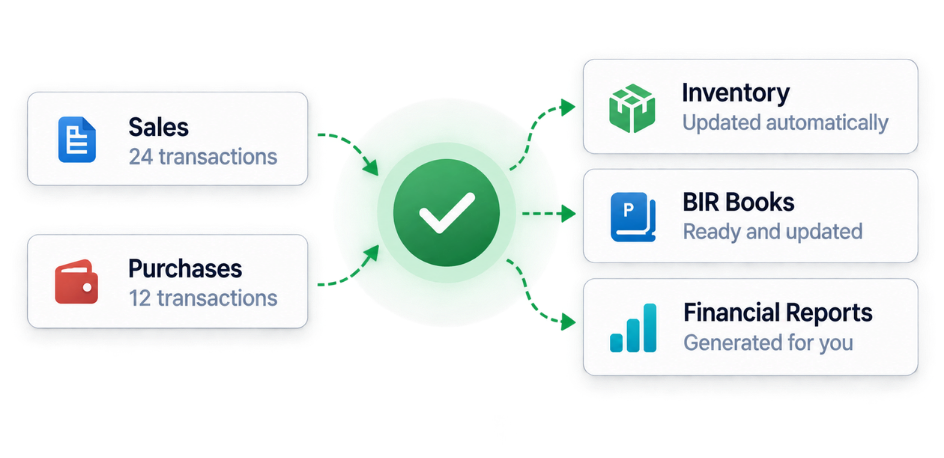
Record sales, purchases, inventory, receipts and payments in one simple workspace. Your books, VAT records, bank reconciliations and financial reports update automatically.
Set up your company accounting workspace in minutes.
Illustrative preview using sample data.
Accounting shouldn't start with debits and credits.
Traditional accounting software often expects you to understand accounting entries before you can record everyday business activity. This software reverses that experience: you record what actually happened, and the system handles the accounting behind it.
How It Works
From business activity to complete accounting records.
Record
Enter your normal business transaction — a sale, purchase, inventory movement, customer payment or supplier payment.
Automatic Accounting
The system creates the correct accounting entries behind the transaction.
Books Update
Your accounting books and ledgers update from the same transaction.
See Your Numbers
View financial statements, balances and business performance without rebuilding everything manually.
Features
A complete accounting system, not just a transaction log.
From day-to-day sales and purchases to inventory, bank reconciliation, VAT compliance and month-end close — it's all one connected system.
Explore everything included
Core Setup
- Multi-company workspace with full data isolation between companies
- Company profile and settings
- Chart of Accounts set up automatically, ready to use
- Guided account creation and editing
- Clear group vs. detail account structure
- Safeguards against deactivating accounts still in use
- Default Philippine tax codes included
- Manage customers, suppliers, and combined contacts in one place
Transactions
- Sales
- Purchases
- Cash Receipts
- Cash Disbursements
- Manual Journal Entries
- Customer Returns / Credit Notes
- Supplier Returns / Debit Notes
- Customer and supplier refund settlements
- Save as draft, post, reverse, or discard — with the right safeguards at each step
Accounting Engine
- Every transaction posts itself to the General Ledger automatically
- Built-in double-entry bookkeeping behind every screen
- Every journal entry is validated to balance before posting
- Posted transactions can't be silently edited — only reversed
- Full reversal entries preserve your audit history
- Document numbers stay unique per company
- Closed accounting periods and finalized VAT periods are protected from new postings
- A full audit trail tracks key actions across the system
Receivables & Payables
- Accounts Receivable tracking
- Accounts Payable tracking
- Apply customer payments against open invoices
- Apply supplier payments against open bills
- Settle receivables and payables carried over from opening balances
- Accounts Receivable Aging
- Accounts Payable Aging
- Returns and refunds tracked through to settlement
Inventory
- Inventory items and product catalog, with optional item images
- Organize items into categories with customizable columns
- Live quantity on hand and reorder level tracking
- Average daily usage to help plan reordering
- Opening stock setup for existing inventory
- Full stock movement history
- Multi-line inventory purchases and sales
- Automatic stock-in on purchase, stock-out on sale
- Moving weighted average costing
- Automatic Cost of Goods Sold
- Purchase and sale reversals update stock correctly
- Stock adjustments for damage, loss, or correction
- Inventory reconciliation report against the General Ledger
Banking
- Bank and cash account setup
- Map bank accounts to your Chart of Accounts
- Bank reconciliation with a live transaction preview
- Finalize or reopen a reconciliation
- Record bank charges, interest, and other adjustments
Reports
- Dashboard
- General Ledger
- Trial Balance
- Income Statement
- Balance Sheet
- Cash Flow Statement
- Accounts Receivable & Payable Aging
- Inventory Reconciliation
- VAT Report and VAT Return Preparation
BIR Books
- Subsidiary Sales Journal
- Cash Receipts Journal
- Subsidiary Purchase Journal
- Cash Disbursements Journal
- General Journal
- General Ledger (BIR format)
- Export any book to Excel
VAT & Tax
- VAT 12%, VAT Exempt, Zero-Rated, and Non-VAT transactions
- Input VAT and Output VAT tracked automatically
- Finalize or reopen a VAT period
- VAT carry-forward handled automatically between periods
- VAT Report exports to Excel
- Returns and refunds included in VAT and BIR reporting
Month-End & Period Close
- Close or reopen an accounting period
- A readiness check before you close — drafts, AR/AP, inventory, VAT, and bank reconciliation are all reviewed first
- Clear status on what's blocking a period from closing
Opening Balances
- Opening General Ledger balances
- Opening Accounts Receivable and Accounts Payable balances
- Finalize or reverse opening balances
- Flows straight into your General Ledger, Trial Balance, Balance Sheet, and AR/AP Aging
Audit & Safety
- Full system audit trail and change history
- Posted records can't be deleted, only reversed
- Draft transactions can be safely discarded before posting
- Built around a real production cutover checklist
Built for the Philippines
Built around Philippine accounting workflows.
The system already understands the records Philippine businesses commonly need to maintain, designed around common Philippine bookkeeping and BIR reporting workflows.
- Sales Journal
- Cash Receipts Journal
- Purchases Journal
- Cash Disbursements Journal
- General Journal
- General Ledger
- VAT-aware transactions
- Excel exports
These are BIR-style Books of Accounts generated from your recorded transactions. This is not a claim of BIR accreditation, approval or government endorsement.
Reports
Know how your business is actually performing.
Your reports are built from the same transactions you record every day.
Income Statement
See revenue, cost of sales, operating expenses and net income.
Balance Sheet
See assets, liabilities and equity.
Cash Flow Statement
See how cash actually moved in and out of the business.
General Ledger
Review detailed movement per account.
Trial Balance
Check balances across your Chart of Accounts.
AR & AP Aging
See which customer and supplier balances are overdue.
Inventory Reconciliation
Confirm your inventory subledger matches the General Ledger.
VAT Report & Return Preparation
Review Input VAT, Output VAT and VAT payable, ready for filing.
Dashboard
A daily snapshot of sales, cash, receivables and payables.
Beginner Friendly
You shouldn't need to be an accountant to record a sale.
Everyday screens use familiar business language while the system maintains the accounting structure underneath — with helpful explanations, tooltips and accounting terms explained right where you need them.
- ✓ Helpful explanations on every transaction screen
- ✓ Tooltips that explain accounting terms in plain language
- ✓ Automatic entry previews before you post a transaction
- ✓ Beginner-friendly transaction forms
Example
Accounts Receivable i
Hover, focus, or tap the "i" to see a plain-language explanation, right where you need it.
Who It's For
Made for businesses that need better accounting visibility.
Business Owners
Understand your numbers without living inside spreadsheets.
Online & Retail Sellers
Organize sales, purchases, collections and payments.
Bookkeepers
Work with structured transactions, ledgers and books.
Growing Companies
Move away from scattered spreadsheets into one accounting workspace.
Books Export
Take your accounting records with you.
Supported accounting books and reports can be exported to Excel (.xlsx) whenever you need them outside the system.
BIR-style books and VAT reports export directly to Excel.
Ready to put your accounting in order?
Create your company workspace and start recording your business transactions in one organized system.
Already have an account? Sign In
FAQ